Email CMS

The email CMS for marketing teams.

Like WordPress separates themes from posts, Modular Mail separates email structure from content. Your templates are configured with locked modules and editable content fields. Your team builds campaigns by filling in those fields and picking from approved variants. Structure protected, content flexible, no code required.

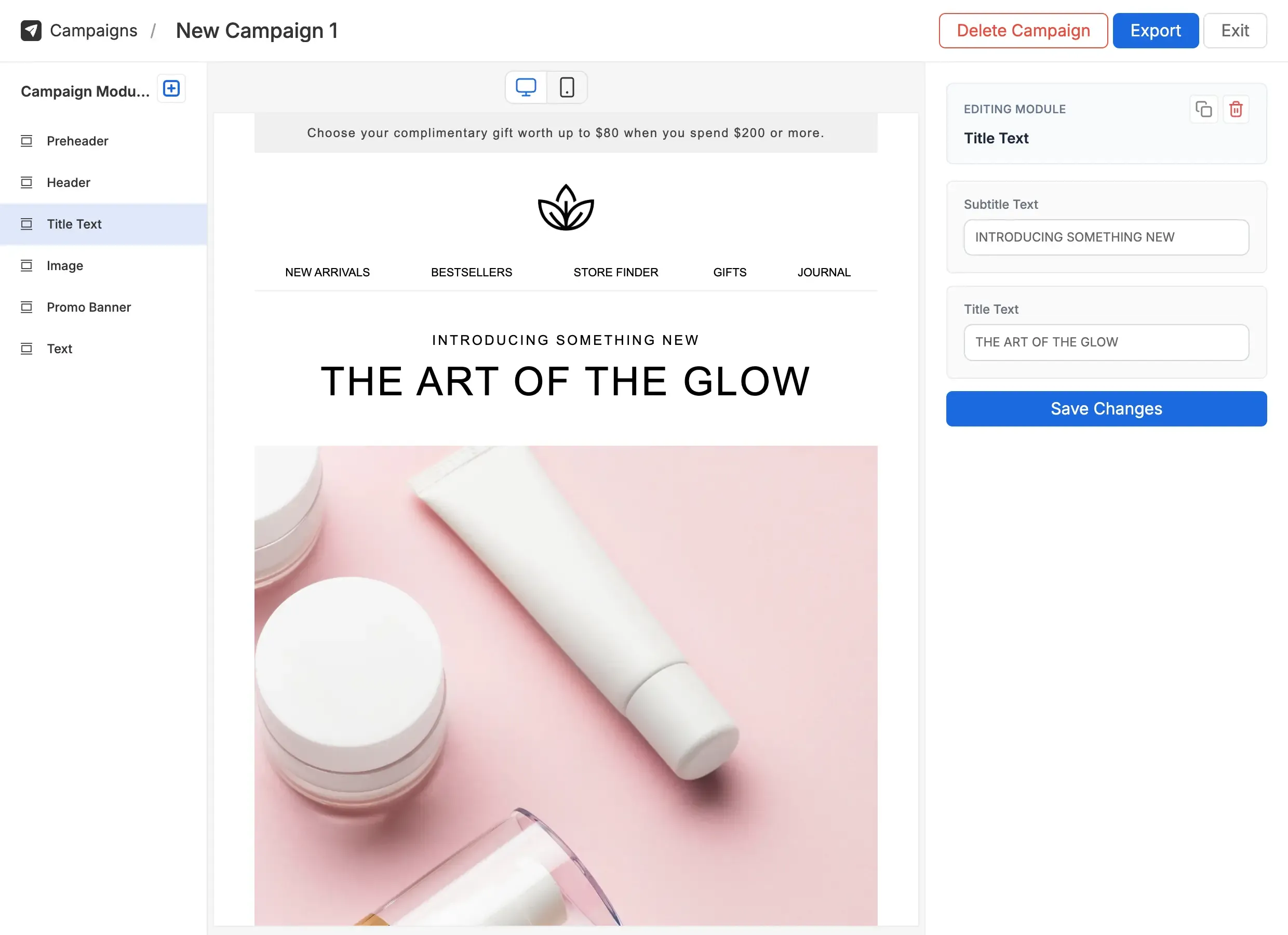
Modular Mail editor showing a campaign built from modules with content fields
What it is

The CMS pattern, applied to email

A web CMS like WordPress separates the theme from the post. The theme defines structure, typography, and layout. The post is just the content that fills it. A non-developer can publish without touching PHP.

An email CMS does the same thing for email. Your template defines the design: modules, fonts, colours, spacing, and structure. Your team manages campaigns by selecting modules, filling in content fields, and picking from approved variants. The HTML is locked. The content is yours.

That's different from email builders, which give a blank canvas every time. With a CMS, the structure is fixed and reliable, but the content is fully editable. Anyone on the team can ship without breaking anything. For teams building a consistent visual language, learn more about email design systems and how they work alongside an email CMS.

The foundation of any email CMS is a good set of modular email templates: reusable blocks that cover the layouts your programme needs, each tested and ready to assemble into campaigns.

How it works

From template setup to a sent campaign

Three stages: install a template, build campaigns from it, expose variants for the things marketers should be able to change.

1. Your template, configured for your team

We convert your HTML email into a Modular Mail template, or you can bring your own developer or agency. The editable areas (text, images, links, modules) are marked with simple `mm-editable` tags. The structure is locked. The content is yours to edit.

  • Use your existing HTML or have us build from your brand guidelines
  • Define modules: hero, product grid, promo, footer, etc.
  • Set per-field rules: max length, required, allowed values
  • Configured once; your team builds campaigns from day one
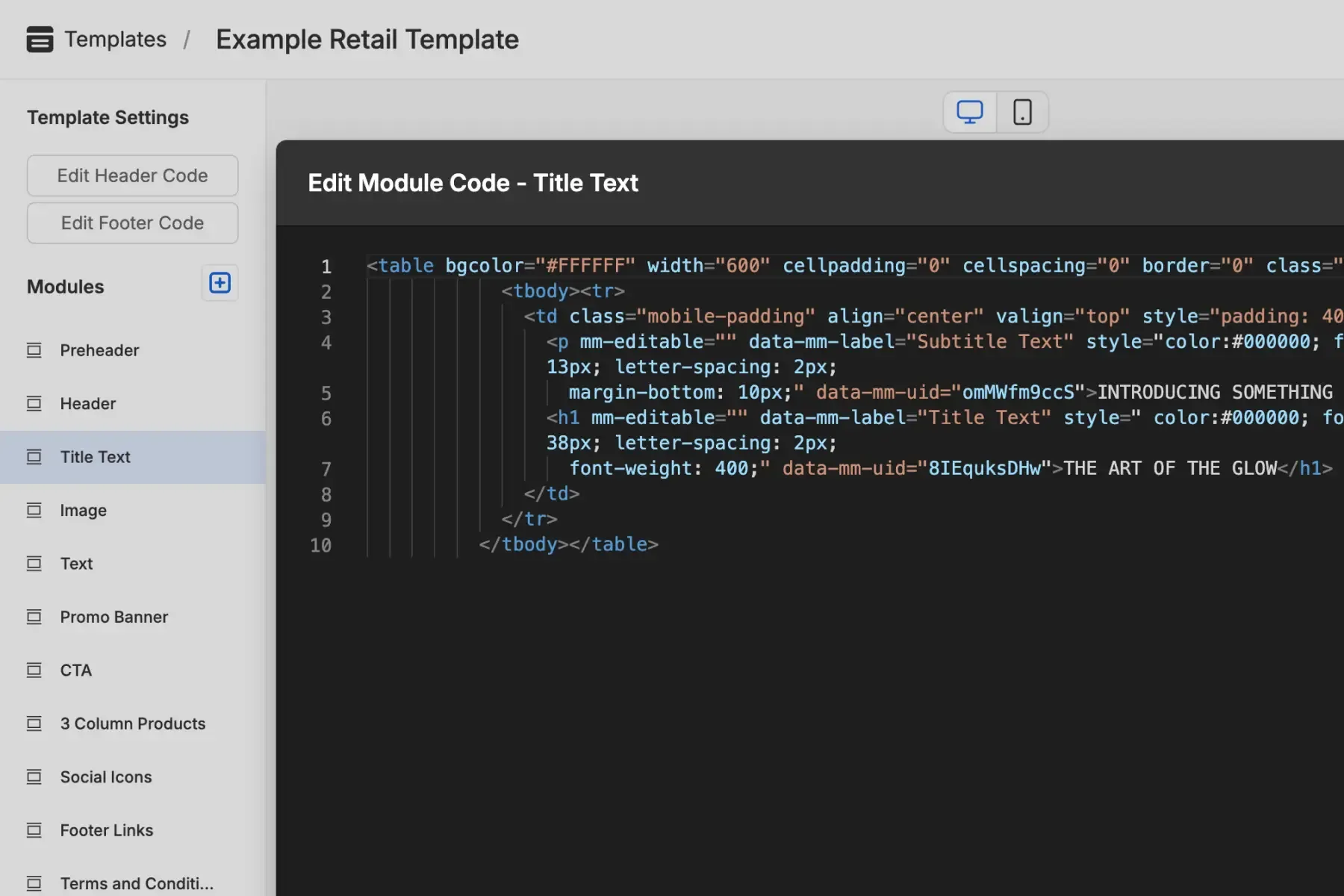
Template structure with locked layout and editable content fields

2. Build campaigns like WordPress posts

A new campaign starts with your template. Pick the modules you need, drag them into order, fill in the fields. Headlines and body copy are text inputs. Images are uploads. CTAs are link fields. Preview as you type.

  • Drag-and-drop module ordering
  • Inline editing on every text field
  • Image upload with automatic alt text
  • Live desktop and mobile preview
  • AI Copy Assistant with brand-voice prompts
Editor showing a campaign assembled from modules with content fields filled in

3. Variables for the things that should change

Templates can expose options without exposing the code. A button module with a colour-variant dropdown. A heading module with three font choices. A product card with two layout variations. Marketers pick from the allowed options; the design stays controlled.

  • Variant options: colour, size, layout, alignment
  • Brand tokens applied to every variant automatically
  • Variables can be per-field, per-module, or campaign-wide
  • Restricted to the values you define. Nothing breaks.
Like configuring a WordPress theme, but for email. Marketers stop pulling in dev for every banner change, and the brand stops drifting.
What marketers see

A clean editor over a locked template

The editor surfaces only what your team should touch. Pick a module, fill in fields, pick a variant. No HTML, no broken layouts.

Variants are the unlock. A button can have three approved colours. A heading can have three font choices. A product block can have two layouts. The set of options is yours to define, and impossible to escape.

  • Drag-and-drop modules
    Pick from your template's module library and reorder by dragging. No starting from blank.
  • Per-field content rules
    Max length, required, allowed values: content rules baked into every field.
  • Variant pickers
    Module options exposed as dropdowns. Pick from approved colours, fonts, and layouts.
  • Live desktop and mobile preview
    See exactly what subscribers will see, in both viewports, while you edit.
  • AI Copy Assistant
    Rewrite, shorten, or refine any text field in your brand voice. No off-brand suggestions.
  • Workspace history
    Every campaign is versioned. Roll back, duplicate, or branch without losing work.
Modular Mail editor with content fields and variant pickers visible
What's inside

The pieces that make a CMS-for-email work

Modules, fields, variants, brand tokens, AI, and one-click export. The whole loop, in one tool.

Modules, not blank canvases

Campaigns are assembled from pre-built modules. Each module is a tested HTML block with editable content fields. No starting from a blank page; no breaking the layout.

Content fields, not raw HTML

Marketers see text inputs, image uploaders, and link pickers. Never markup. Per-field rules (max length, required, allowed values) keep content within the brand.

Variants for visual options

Expose a CTA in three approved colours. Let the marketer pick a heading font from a sanctioned list. Variants are defined once and enforced automatically.

Brand tokens everywhere

Colours, fonts, spacing, and radii live as tokens. Update once and every campaign updates with you. No more hunting through templates to change a hex code.

AI bound to your brand voice

AI Copy Assistant rewrites or generates copy in any field. AI Alt Text writes accessible image descriptions in a click. Both follow your brand voice and restricted-term rules, with no off-brand suggestions.

One-click HTML export

Export to clean, tested HTML and upload to any ESP. The output is ESP-agnostic, accessible, and tested across Outlook, Gmail, Apple Mail, and the rest.

Who it's for

Built for teams who ship real email programmes

Marketing teams shipping weekly

If you're sending more than four campaigns a month, every dev round-trip is a tax. An email CMS pays back the setup cost in weeks.

A B2B brand sends 20+ campaigns a month. The dev queue used to add three days to each. Now the team builds and previews same-day; dev only sees a ticket when a new module is needed.

Agencies handing off to clients

Build the client's template once. Hand them a content-field interface. Stop being on the hook for every banner change.

An agency runs eight clients' email programmes. Each client has their own Modular Mail workspace. Clients self-serve campaign creation; the agency keeps the templates and design system intact.

Teams with templates they can't use

If you've got HTML emails that only one person can edit, an email CMS unlocks them. No rebuild required.

A retailer commissioned five custom HTML templates two years ago. Only the developer who built them can edit safely. After Modular Mail setup, the marketing team builds from those templates without touching code.

ESP-agnostic

Export to any email platform

Build in the editor, export clean HTML, drop it into your ESP. No integrations to maintain, no vendor lock-in.

  • Mailchimp
  • HubSpot
  • Salesforce
  • Klaviyo
  • Constant Contact
  • ActiveCampaign
  • Marketo
  • Braze
  • SendGrid
  • Campaign Monitor
  • Pardot
  • Iterable
  • any platform that sends HTML email
FAQ

Email CMS, in detail

  1. What is an email CMS?
    An email CMS (email content management system) is a platform where templates are set up with defined content areas, and marketing teams manage campaign content through those fields. The underlying template structure is protected, so layouts, fonts, and brand styling can't be accidentally changed. It's the email equivalent of how WordPress separates content from design.
  2. How is an email CMS different from an email builder?
    An email builder (like Stripo or Beefree) gives users full creative freedom to construct emails from scratch. An email CMS locks the template structure and lets users edit only the content. Builders are ideal when you need maximum design flexibility. A CMS is ideal when you have templates and need consistent campaigns from them.
  3. How do variables work in Modular Mail?
    Variables let a template expose options without exposing the code. A CTA module can offer three approved button colours; a heading module can offer three brand fonts; a product block can offer two layouts. Marketers pick from the values you define. Anything not on the list isn't possible to break.
  4. Do I need a developer to use it?
    Not for day-to-day use. Template setup is handled by us, your agency, or your developer. After that, your marketing team works in the content editor independently. If you need help with setup, we offer it as a service.
  5. What email platforms does it work with?
    Any platform that accepts HTML. Build campaigns in the editor, export clean HTML, upload to Mailchimp, Klaviyo, HubSpot, Salesforce Marketing Cloud, Marketo, or anywhere else. No integrations required, no vendor lock-in.
  6. Can I use my existing HTML email templates?
    Yes. If you already have HTML email templates, a developer can mark them up with `mm-editable` tags and upload them. The design stays exactly as it is; your team gets a content-field editor over the top. Read more about modular email templates.
  7. How does the AI assistance work?
    Two built-in tools, both bound to your brand voice and restricted-term rules. AI Copy Assistant generates and refines text from any field with quick actions (Rephrase, More concise, More urgent) or your own prompt. AI Alt Text reads your images and writes accessible descriptions in one click. Suggestions follow your workspace's brand guidance automatically.
  8. How is this different from an email design system?
    An email design system is the framework (tokens, components, rules) that defines how your emails should look. An email CMS is the tool that implements and enforces it. Modular Mail is both: your template defines the design system, and the platform enforces it on every campaign.
Get started

A CMS for your email programme.

See how Modular Mail works for your templates and your team.