Scaling across flows and campaigns
Keeping design consistent across welcome flows, abandoned cart, win-back, and weekly promotions is hard when each one is built separately in a drag-and-drop editor.
Modular Mail is an email CMS. Your ecommerce template library is configured with locked modules and editable content fields. Marketers build campaigns by filling in fields, then export clean HTML to Klaviyo. Consistent design across every flow and weekly send.
Klaviyo is strong for ecommerce: segmentation, flows, SMS, analytics, and product data. Building email content consistently across flows and weekly sends is the part that gets messy.
Klaviyo's drag-and-drop editor is good for quick campaigns. As your programme grows and multiple people start building emails, design consistency starts to drift. Button colours, font choices, spacing: every small deviation accumulates.
Klaviyo supports custom HTML templates, which is exactly what design-conscious brands want. But every update to that HTML means another developer ticket. For teams sending weekly, the queue becomes a bottleneck.
Ecommerce emails live and die on the product grid. Getting the structure, image ratios, and typography exactly right every time requires precision. Free-form editing makes that precision hard to maintain at volume.
A welcome flow, an abandoned cart flow, and a win-back flow should all feel like they come from the same brand. When each is built independently in a drag-and-drop editor, that consistency depends entirely on team discipline. A locked template system makes it automatic.
If you manage Klaviyo for multiple clients as an agency, see how agencies use Modular Mail.
These are the patterns we hear most from ecommerce teams using Klaviyo at scale.
Keeping design consistent across welcome flows, abandoned cart, win-back, and weekly promotions is hard when each one is built separately in a drag-and-drop editor.
Custom HTML templates keep the design locked, but every update needs a developer. Content changes, test variants, and new campaigns all wait in the queue.
Ecommerce teams running weekly promotional emails can't afford a dev round-trip on each one. The volume demands a system where marketers build campaigns without technical help.
Product grids, hero banners, and promotional modules need to match the brand every time. Free-form editing in a drag-and-drop editor means spacing, fonts, and colours drift.
Your module library is configured once. After that, your team builds every campaign from the same tested components.
Your developer, agency, or our team sets up your module library in Modular Mail: hero, product grid, USP, CTA, footer, and any custom layouts your programme needs. Structure is locked with mm-editable tags. See the template setup service.
Marketers pick modules, fill in product copy, upload images, and reorder sections. Preview renders live on desktop and mobile. AI Copy Assistant helps with subject lines and body copy.
One-click export produces clean HTML. Upload to Klaviyo as a template or paste it into a specific flow email or campaign. Add Klaviyo personalisation variables after upload.
A clean editor over a locked template library. Pick a module, fill in content fields, preview, export.
Your product grids, heroes, and CTAs look the same every time. The only variable is the content.
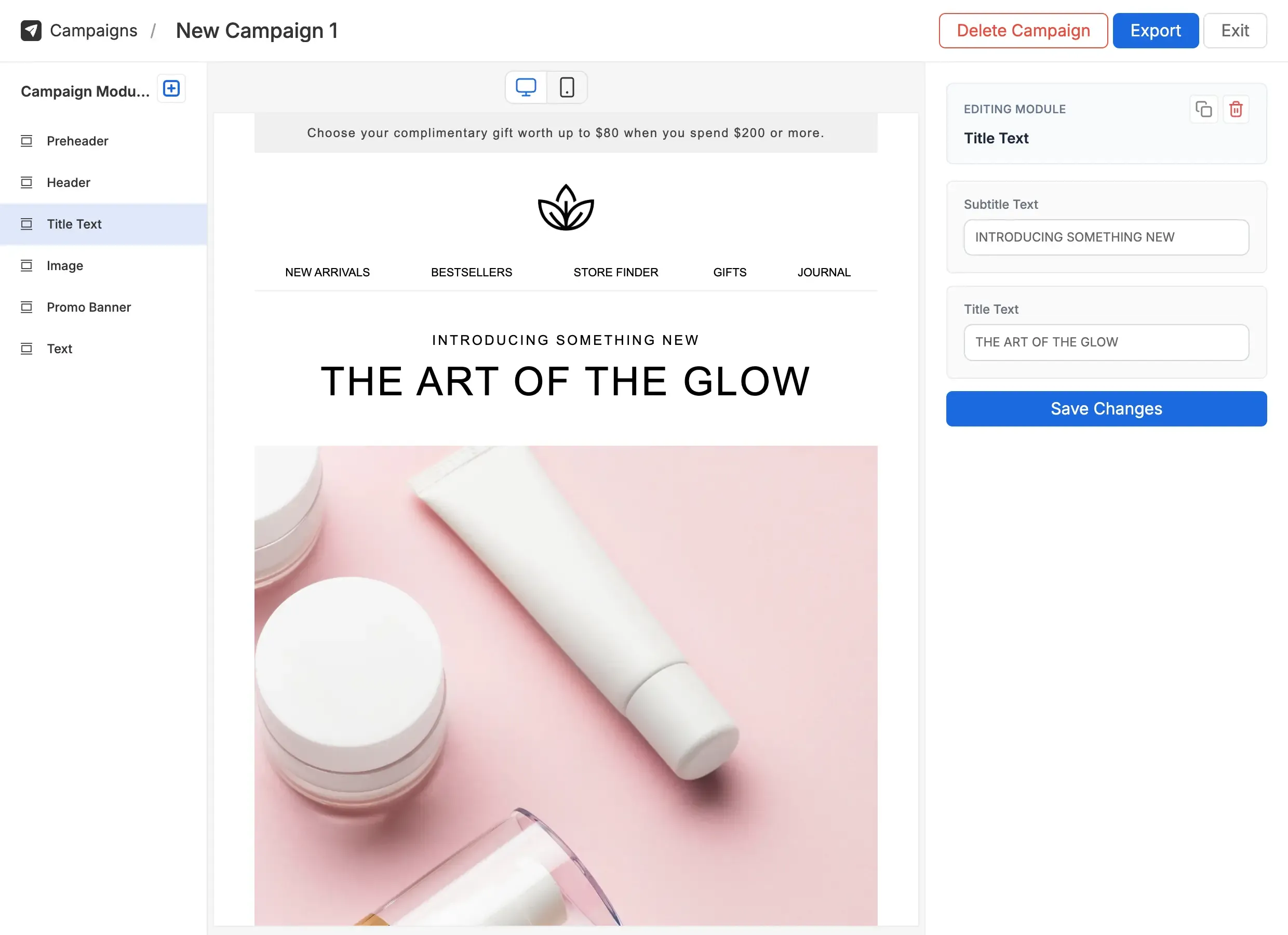
A factual comparison. Add Modular Mail as a CMS layer; keep Klaviyo for sending, flows, and analytics.
| Feature | Klaviyo email editor | Klaviyo + Modular Mail Recommended |
|---|---|---|
| Template setup | Drag-and-drop blocks or custom HTML editor | Standard HTML with mm-editable tags |
| Brand guardrails | Limited; users can adjust styles in drag-and-drop | Locked structure; only content fields are editable |
| Product grids | Dynamic product blocks with Klaviyo data | Module structure locked in Modular Mail; dynamic product data added in Klaviyo after export |
| Consistency across flows | Depends on team discipline | Same module library used everywhere; consistency built in |
| Who can build campaigns | Anyone, with risk of design drift | Anyone. Structure is locked, only content is editable |
| ESP portability | Klaviyo-specific editor | Export clean HTML to any ESP |
| Preview and testing | Klaviyo preview; separate tools for rendering tests | Live desktop and mobile preview, plus Litmus / EoA integration |
Brands sending weekly promotions, product launches, and seasonal campaigns alongside automated flows need a system that holds the design together at volume.
A DTC brand sends weekly promotions and runs flows for welcome, abandonment, and win-back. The template library is set up once in Modular Mail. The email team builds every send from the same tested modules.
Brands with recurring purchase cycles send a predictable mix of reorder reminders, loyalty updates, and promotional pushes. A locked template system keeps every send on-brand without adding manual overhead.
A subscription skincare brand runs monthly reorder reminders alongside new product launches. Each email is built from the same tested module library. The design stays consistent whether the send is automated or one-off.
Growing ecommerce teams adding headcount to their email function need to bring new team members up to speed without giving them access to raw HTML.
An ecommerce team growing from one email person to three needs a system that any team member can use safely. Modular Mail gives each person access to the same module library, with no risk of breaking the design.
{{ first_name }} or product loop syntax) directly in Klaviyo's template editor after uploading. Modular Mail handles the design structure; Klaviyo handles the personalisation.mm-editable tags. We also offer professional template conversion as a service.