Tickets for tiny edits
The client needs a banner changed. A subject line is wrong in a template. A CTA button colour needs updating. Every small request comes back to your team, and the work never scales.
Build the template system once. Define the content fields. Hand the client their own workspace. They self-serve campaign creation from the modules you locked. Your design stays intact. Your team stops being the bottleneck.
If you build email templates for clients, you've almost certainly hit at least one of these.
The client needs a banner changed. A subject line is wrong in a template. A CTA button colour needs updating. Every small request comes back to your team, and the work never scales.
You hand over edit access and the client changes fonts, deletes padding, or overwrites a module. They don't know they've broken it until you see the send. The client blames the template.
Your best templates are custom builds. But the production model depends on your team being in the loop for every campaign. The design quality doesn't translate into margin.
Agencies build great email templates. The problem comes after delivery.
Scenario one: the client can't edit them safely, so every small change becomes a support ticket. The banner needs updating for a promotion. The CTA text needs changing. The footer address has moved. Each one is trivial work for your team, but it's still your team's time.
Scenario two: you hand over HTML access so the client can self-serve. They edit the template. Something breaks. A font changes. Spacing disappears. The layout collapses on mobile. The client sends the broken email, notices after the fact, and the conversation turns toward the quality of the template.
Neither outcome is good for your agency's positioning or your margins.
Modular Mail solves both. You build the template system and lock it. The client gets a workspace where they can only edit the content fields you defined: text, images, links, CTAs. They cannot touch the structure. They cannot break the layout. They cannot drift from the brand.
The client self-serves campaign production. Your team moves on to higher-value work. The design you delivered stays exactly as it was.
If you also need to convert Figma designs into production-ready email code, our Figma to HTML email conversion service handles that for you.
Three stages from a Figma file to a client who builds their own campaigns.
Convert the client's Figma designs or existing HTML into a locked module library in Modular Mail. Or send us the designs and we handle the build. See the Figma to HTML service.
Mark up each module with mm-editable tags to define exactly what the client can change: headline text, body copy, images, CTA links. Everything else is locked.
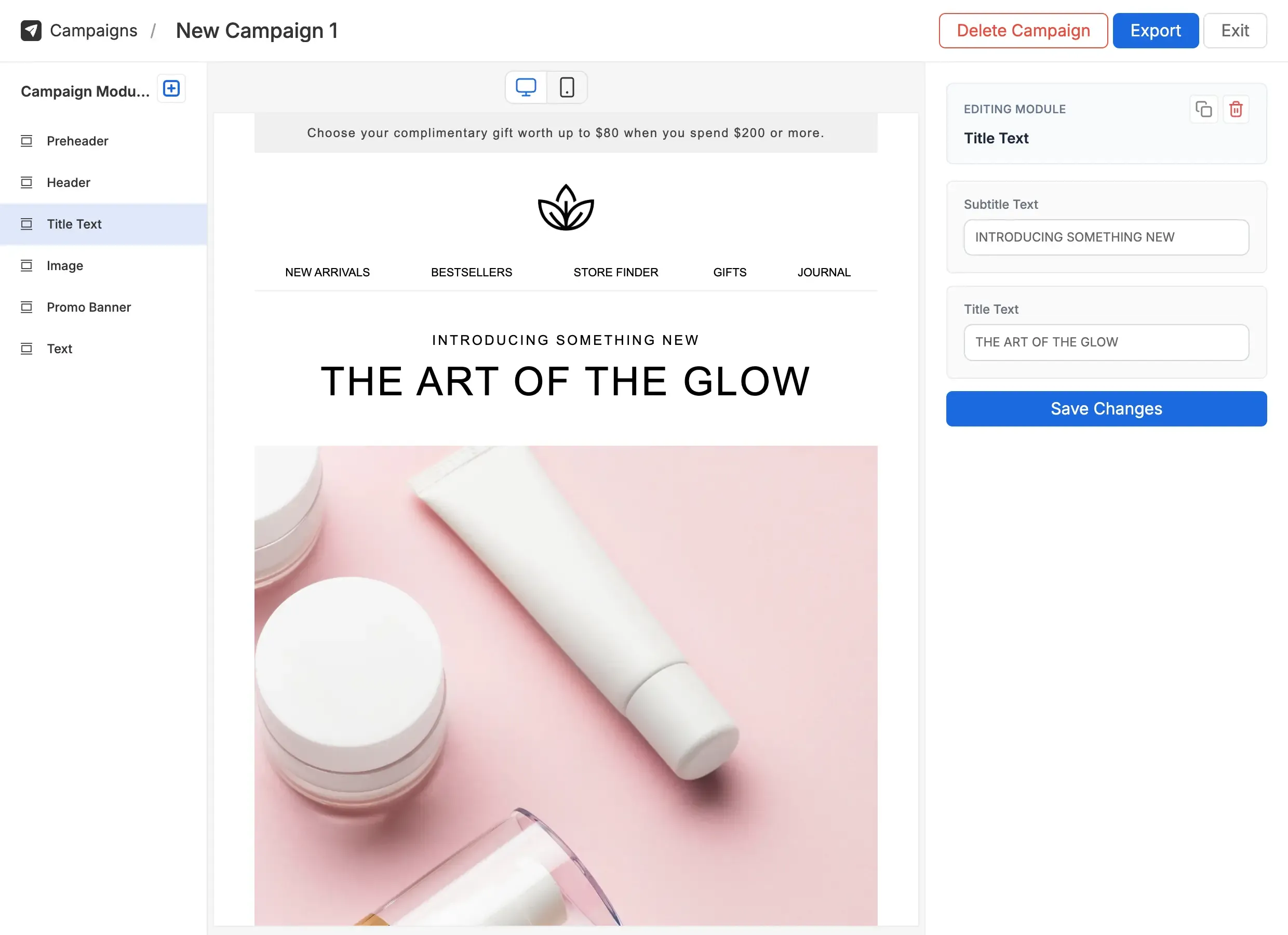
The client gets access to their own Modular Mail workspace. They see their modules, their content fields, and nothing else. They build campaigns. You stay out of the day-to-day.
Your client sees their module library, their brand, and content fields. They don't see HTML, template structure, or anything they could break.
The guardrails are invisible to the client. They feel like they have full control. You know the design is protected.
Agencies that build email templates as a core service. You deliver the design system once, then Modular Mail handles the client's day-to-day campaign production.
An email production agency delivers template systems to ten clients a year. Each client gets their own workspace and module library. Production work moves to the client; new module requests stay with the agency.
Agencies managing lifecycle and CRM programmes for clients need the design to stay locked while client teams handle the content. Modular Mail is built for exactly that split.
A CRM agency manages email programmes for multiple ecommerce clients. Templates are set up and owned by the agency. Clients build sends from the defined module library without pulling the agency back in.
Agencies delivering across channels: web, social, and email. Email is one service line. Modular Mail lets you deliver high-quality email systems without building a dedicated email team. Handing over a locked template system turns one-off builds into a retainer-friendly service.
A full-service agency adds Modular Mail to their retainer offering. Clients self-serve weekly campaign production. The agency stays involved for new template work, not for content updates.
Agencies building Shopify stores often inherit the email programme too. Modular Mail gives you a clean way to deliver a professional email system alongside the store build.
A Shopify agency includes an email template system in every store launch. The client gets a Modular Mail workspace with their brand's module library. Email production is self-service from day one.
mm-editable tags to any HTML template to define the editable areas. If you prefer us to handle the build, we offer Figma to HTML conversion as a service.