Faster campaign production
Build campaigns faster with reusable modules and a visual CMS interface. Marketers work independently without waiting on developers.
Protect your email design system while giving marketers the freedom to update content. Build campaigns with reusable modules, preview instantly, and export to SFMC.
If SFMC Content Builder keeps breaking your email templates, you are not alone. Marketing teams report spending hours troubleshooting template issues, needing developers for every change, and dealing with rigid design limits. Modular Mail is an email template CMS that works alongside Salesforce Marketing Cloud. It gives you structure protection and content flexibility without the developer bottleneck.
SFMC is powerful for automation and CRM, but Content Builder and Email Studio have limitations that slow down email production. Here is what teams run into:
Content Builder can feel unintuitive for marketers who just want to update copy or swap images. The interface is complex, previews are slow, and teams often need training just to make basic changes. An email CMS with simple content fields solves this.
Content Builder has a 250-component limit and templates can break when updated. Blocks get duplicated, layouts shift unexpectedly, and Journey Builder edits require creating new versions. A CMS approach keeps your template structure protected.
Content Builder auto-generates CSS classes that override your styles. You cannot use custom web fonts, and button styling is limited. Maintaining a consistent email design system requires hand-coding or external tools.
Most Content Builder changes require developer help. Marketing teams cannot update templates without risking broken layouts. An email CMS separates content from code so marketers edit fields while developers control the structure.
Emails built in Content Builder do not always render consistently in Outlook, Gmail, or mobile clients. Column spacing breaks, images scale incorrectly, and teams spend hours testing and fixing issues that a pre-tested module system would prevent.
Campaign updates are slow because every change goes through developers. Journey Builder is rigid for email edits. With an email CMS, marketers make content updates independently while the design system stays intact.
Modular Mail is a CMS layer that sits alongside SFMC. You keep using Salesforce for automation and sending while gaining a proper email design system with protected templates and editable content fields.
Marketers edit text, images, and links through simple content fields. No code knowledge required. The CMS interface shows exactly what can be edited, so teams build campaigns confidently without touching HTML.
Your email design system stays locked. Developers define the module structure once, and that structure cannot be broken by content editors. No more duplicated blocks or shifting layouts when templates are updated.
Define global tokens for colors, fonts, spacing, and typography. Your brand guidelines are built into the system, so every email stays on brand. No more SFMC overwriting your styles or limiting your font choices.
Export production-ready HTML with proper CSS resets, semantic markup, and accessibility attributes. The code is optimized for email clients, so you get better deliverability and consistent rendering without manual cleanup.
Every module is tested across Outlook, Gmail, Apple Mail, and mobile clients before you use it. Preview responsive behavior in the editor, then export knowing your layouts will render correctly everywhere.
With a central library of approved modules and one-click SFMC export, marketing teams update campaigns without developer help. Production cycles shrink dramatically, and developers focus on strategic work instead of routine edits.
Set up your email design system once, then build campaigns without developer help. Here is how Modular Mail works with your SFMC workflow.
A developer uploads your master HTML template (or Figma design) and defines reusable modules using simple mm-editable tags.
Our expert team can help convert existing SFMC templates.
Build campaigns visually with approved modules; your design remains intact while content is flexible
One-click export generates production-ready HTML that respects SFMC's formatting and component constraints. Upload to Email Studio or any other ESP. Your emails will render consistently across all major email clients and devices.
Keep using Salesforce for automation and personalization. Add Modular Mail for email template management that marketing teams can actually use.
Build campaigns faster with reusable modules and a visual CMS interface. Marketers work independently without waiting on developers.
Define your design tokens once: colors, fonts, spacing. Your email design system stays consistent across every campaign and team.
Export clean, accessible code that renders correctly in all email clients. No manual cleanup or testing workarounds needed.
Export to SFMC, Klaviyo, Marketo, or any ESP. Your templates are portable. No vendor lock-in.
Content editors update campaigns through simple fields. Developers set up the system once and focus on strategic work.
Our team converts your existing SFMC templates or Figma designs into a modular CMS system. Get up and running quickly.
See how adding an email CMS layer improves your SFMC email production workflow.
| Feature / Workflow | Standard SFMC | SFMC + Modular Mail Recommended |
|---|---|---|
| Design flexibility | Limited modules & component caps | Reusable modules with no design limits |
| Ease of use | Hard to visualise & slow editing | Intuitive drag-and-drop for marketers |
| Brand consistency | Requires manual coding or splitting templates | Global tokens & locked layouts keep designs on-brand |
| Code quality | Table-based layouts & verbose HTML | Clean, accessible HTML with CSS resets |
| Mobile & rendering | Inconsistent across clients | Pre-tested modules render consistently everywhere |
| Production speed | Requires developer assistance for changes | No-code updates shorten production cycles |
Marketing teams, agencies, and enterprises who want to manage email content without developer bottlenecks while keeping their Salesforce automation intact.
Create weekly campaigns without waiting on developers. Update content, swap images, and launch faster, all while maintaining brand consistency across teams and regions.
A Fortune 500 CRM team needs to launch 20+ email campaigns per month across multiple regions without relying on their overworked development team for every content change.
Manage multiple client accounts while keeping each brand consistent. Modular Mail's reusable modules and visual editor reduce revision cycles and allow you to deliver campaigns efficiently without sacrificing quality.
A digital agency managing campaigns for many enterprise clients using SFMC needs to deliver pixel-perfect, on-brand emails quickly while reducing the back-and-forth with clients.
Localize campaigns across multiple regions and languages while maintaining design consistency and brand compliance at scale. Single source of truth for all teams.
A multinational corporation needs to send localized campaigns across EMEA, APAC, and Americas, each in multiple languages, while ensuring every email matches their global brand standards.
Modular Mail gives you a proper content management layer for email. Your developers define the template structure once, then marketers update content through simple fields. No more waiting on developers for routine changes.
Think of it like a website CMS, but for email. Templates define what can be edited. Content editors fill in the fields. The design system stays protected while content stays flexible.
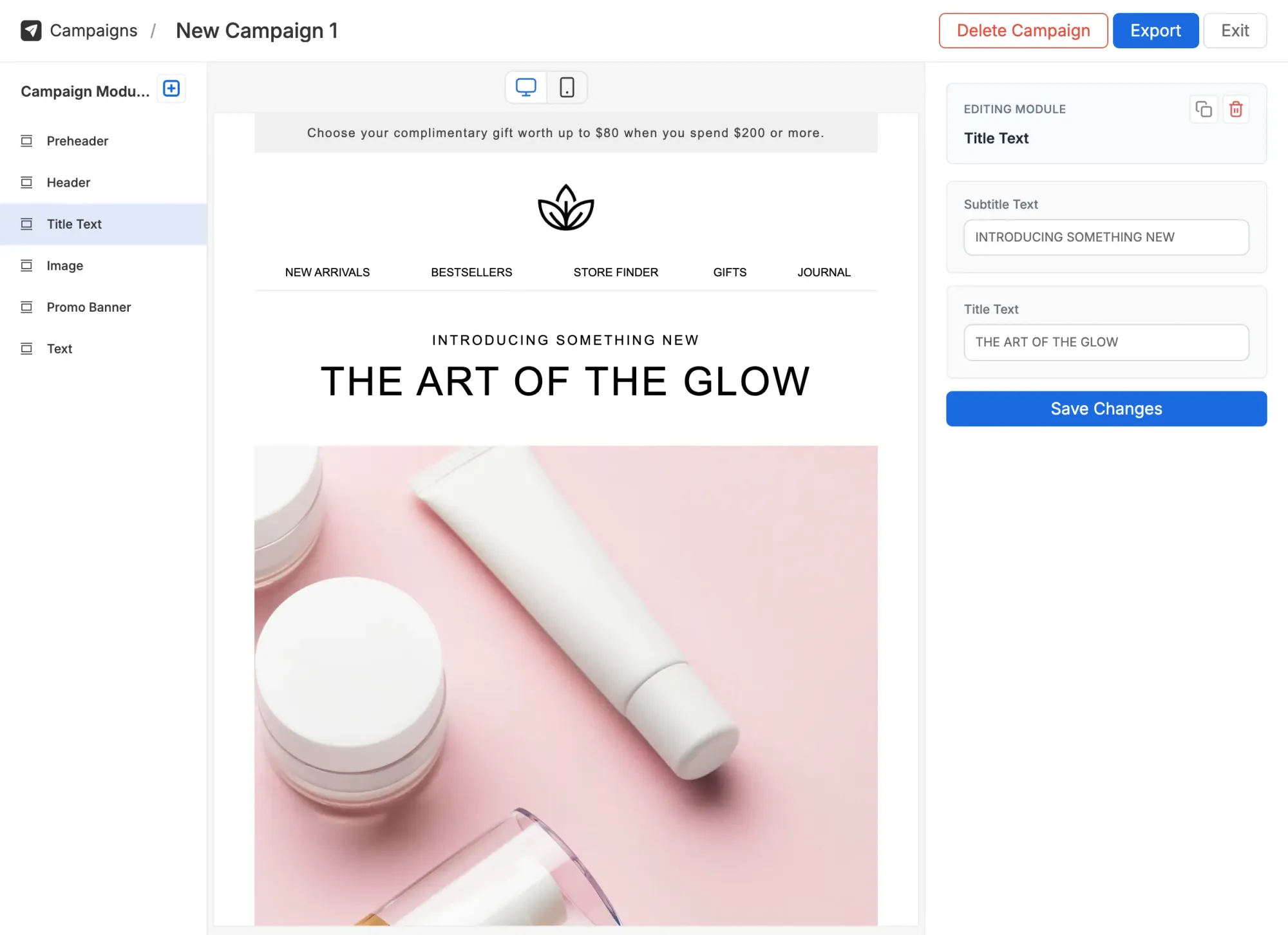
See how an email CMS makes SFMC template management simple.