Email CMS: Manage Email Content, Not Code
Modular Mail is an email content management system that separates structure from content. Your templates define the layout. Your team manages email content through editable fields. The design stays locked, the brand stays consistent, and no one touches code.
What Is an Email CMS?
An email CMS (email content management system) is a platform where developers or agencies set up email templates with defined content areas, and marketing teams manage campaign content through those fields. The underlying template structure is protected. The brand stays consistent. No code required.
Think of how a web CMS like WordPress works. A developer builds the theme. Content editors publish posts and pages through a visual interface without touching PHP or CSS. An email CMS applies the same principle to email: the structure is set up once, and your team can manage email templates through defined content fields.
This is different from email builders that give users a blank canvas. In an email CMS, templates define what can be edited. Content editors fill in the fields. The email design system stays protected while content stays flexible.
How an Email CMS Works
The template structure is set up once. Your team manages the content from that point forward.
Set Up Template Structure
A developer or agency uploads your HTML templates and defines reusable modules with editable content fields
using simple mm-editable tags. Like configuring a CMS theme. No proprietary syntax to learn. Our
team can also handle template setup for you.
Marketing Manages Content
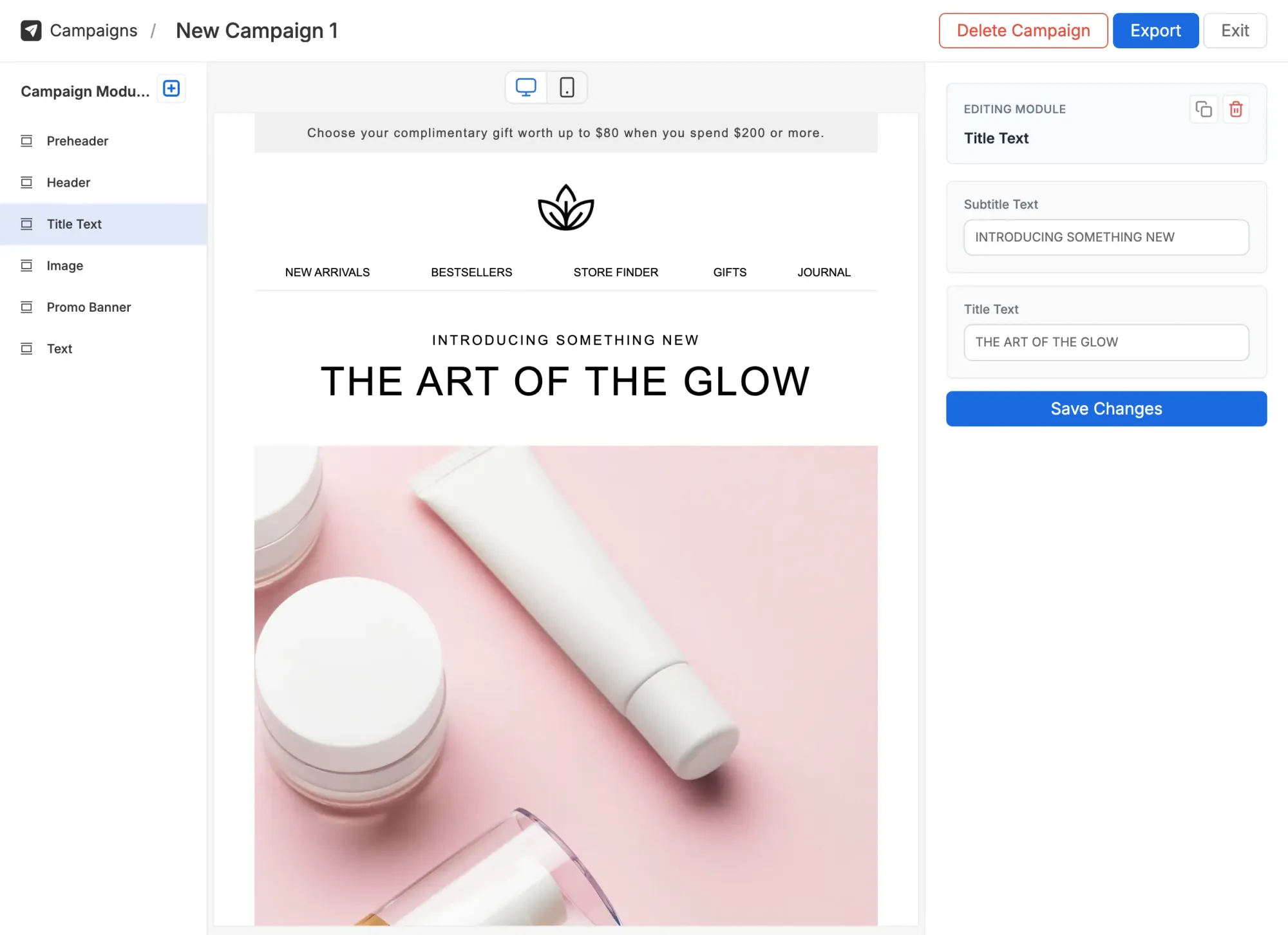
Your team sees content fields: text, images, links, CTAs. They select modules, fill in fields, reorder sections, and preview across desktop and mobile. Built-in AI helps generate and refine copy right in the editor, following your brand voice automatically. This email template management approach keeps structure protected while content is fully editable.
Export to Any Email Platform
One-click export generates production-ready HTML. Upload to Mailchimp, Klaviyo, HubSpot, Salesforce, Marketo, or any ESP. Your email CMS is completely ESP-agnostic. No vendor lock-in, ever.
Email CMS vs. Email Builders vs. ESP Editors
These are three different approaches to email creation. Each serves a different need. Understanding the differences helps you choose the right tool for your team.
Email Builders
Stripo, Beefree, Chamaileon
Full creative freedom. Users construct emails from scratch using drag-and-drop components.
- Governance Guidelines only
- Editing Everything is editable
- ESP flexibility Varies by tool
- AI assistance Varies / external tools
- Best for Teams needing maximum design freedom
ESP Native Editors
Mailchimp, Klaviyo, HubSpot
Built-in editors tied to a specific email platform. Convenient, but limited.
- Governance Limited controls
- Editing Platform-specific templates
- ESP flexibility Locked to one platform
- AI assistance Limited or none
- Best for Teams committed to a single ESP
Email CMS
Modular Mail
Template structure locked. Content editable through defined fields. Brand governance enforced by design.
- Governance Enforced by the platform
- Editing Content fields only
- ESP flexibility Works with any ESP
- AI assistance Built-in, follows brand guidelines
- Best for Teams needing consistency at scale
The core difference: In a builder, users construct emails. In a CMS, templates define the structure and users fill in content. If you need full creative freedom, use a builder. If you have established templates and need consistent, on-brand campaigns with protected structure, use a CMS. Modular Mail works as an email CMS alongside platforms like Marketo and Salesforce Marketing Cloud.
Why Marketing Teams Need an Email CMS
An email CMS changes how your team works with email. Template management becomes content management. Developer bottlenecks disappear. Brand consistency becomes automatic.
No Developer Bottleneck
Marketing teams edit content fields, not code. No more waiting days for a developer to make a simple content change. Developers set up the system once and focus on strategic work.
Brand Consistency Enforced
Template structure is locked. Layouts, fonts, colors, and spacing cannot be broken by content editors. Your email design system is enforced by the platform, not by guidelines.
Works With Any Email Platform
Export clean HTML to Mailchimp, Klaviyo, HubSpot, Salesforce Marketing Cloud, or any ESP that accepts custom HTML. No vendor lock-in, no integrations required.
Faster Campaign Production
Build campaigns by selecting pre-approved modules and filling in content fields. Built-in AI generates first-draft copy and image alt text so your team moves faster. No more starting from scratch every time.
Fewer Errors and Broken Layouts
Every module is pre-tested across Outlook, Gmail, Apple Mail, and mobile clients. Content editors cannot break the underlying HTML. No more cleanup after every campaign.
Scale Without Adding Headcount
One template system powers unlimited campaigns across teams, brands, and regions. Add new content editors without adding complexity or risk.
Who Uses an Email CMS?
Teams who need professional email output without the technical overhead or the risk of things breaking.
Marketing Teams Without Developers
You don't need a developer to publish a blog post. You shouldn't need one to send an email campaign. An email CMS gives your team professional templates with editable content fields. Build campaigns independently.
A B2B company needs to send 20+ campaigns per month. Their developer set up the template system once. Now the marketing team builds and launches campaigns the same day.
Agencies Managing Client Templates
Build each client's template library once. Convert your designs into a managed content system. Clients edit content fields while your template structure stays protected. Fewer revision cycles, faster delivery.
A digital agency manages email for 8 clients. Each client has their own template system. Clients self-serve campaign creation without breaking the agency's designs.
Teams With Existing HTML Templates
You have perfectly good templates sitting unused because they are 'just HTML.' An email CMS makes them editable without rebuilding anything. Your team gets a visual editor. Your templates stay exactly as designed.
A company invested in custom HTML templates but only one person can edit them. After uploading to an email CMS, the entire marketing team builds campaigns independently.
How Modular Mail Works as Your Email CMS
Modular Mail gives you a proper content management layer for email. Your developers define the template structure once. Marketers update content through simple fields. No more waiting on developers for routine changes.
- Drag-and-drop module selection Assemble emails from pre-approved, tested modules
- Editable content fields Text, images, links, and CTAs. No code, no HTML
- Design system support Global tokens for colors, fonts, and spacing across all campaigns
- One-click HTML export Production-ready code for any ESP. Clean, tested, accessible
- AI copy assistant Generate and refine copy from any text field with quick actions like Rephrase and More concise. Your brand voice and restricted terms are applied automatically
- AI-generated alt text One-click accessible image descriptions using AI vision. Optimized for email, on-brand automatically
Export to Any Email Platform
Modular Mail is ESP-agnostic. Build your campaigns in our editor, then export production-ready HTML that drops straight into your email platform. No custom integrations, no vendor lock-in.
Plus any platform that accepts HTML email code